

ChatGPT Hacks Nobody Talks About
ChatGPT Hacks Nobody Talks About
Until Now
Not another list of “write better prompts” advice. These are the architectural levers — the memory configurations, the invisible project scaffolding, the self-critique loops — that separate the operators from everyone else.
I spent three months watching the same prompt engineering article get published 40 times with different bylines. They all cover role assignment, chain-of-thought, and “be specific.” That is table stakes. The actual gap between a power user and a tourist isn’t technique — it’s architecture. How ChatGPT’s memory works at a structural level. What Projects actually do to context. Which features shipped quietly in Q1 2026 that nobody benchmarked. How to make the model critique itself without flattering you.
This piece covers none of the basics. If you want “add context to your prompts,” there are 40 other articles for that. This is for people who have already done that and still feel like the model is underperforming.
The thing most people configure wrong before they even type their first prompt
Custom Instructions exist. Memory exists. Projects exist. Almost nobody sets all three deliberately. And when they collide — which they do, constantly — the model resolves conflicts silently by giving inner-layer instructions priority, with no warning that the outer ones were overridden.
Here’s the actual architecture: Global Memory (what ChatGPT saves across all conversations) is the outermost shell. Custom Instructions wrap the next layer. Project Instructions sit inside that. The active conversation sits at the core. Inner layers win conflicts. This means your carefully written Custom Instruction telling the model “always respond in formal British English” evaporates the moment you create a Project with different instructions.
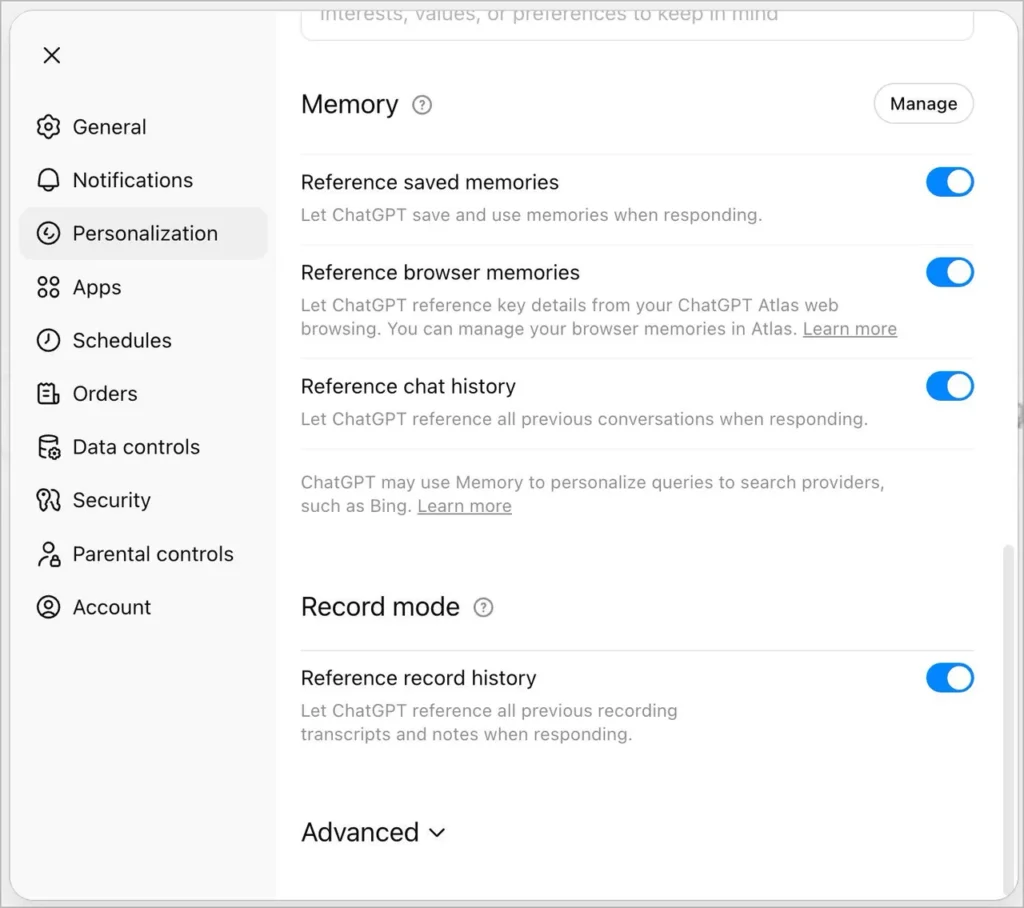
Most people never notice because ChatGPT doesn’t surface these conflicts. You just get subtly different outputs and assume the model is being inconsistent. The fix is simple: audit all three in one session. Go to Settings → Personalization → Memory, then Settings → Custom Instructions, then each Project → Project Instructions. Look for contradictions. Delete or reconcile them.
Memory is not what you think it is
People treat ChatGPT’s memory like a database: facts go in, facts come out. The reality is messier and more interesting. Memory is a generative summary, not a literal transcript. ChatGPT decides what to remember based on patterns of what you discuss repeatedly, what you correct it on, and what you explicitly ask it to store.
The practical implication: the model is more likely to remember a preference you stated twice across two sessions than a critical fact you stated once. This is backwards from how most people think about it. They share one important fact (“I’m writing a book for enterprise CTOs”) and assume it’s saved. It might be — or it might not be, depending on how much competing information the model surfaced in that session.
As of June 2026, OpenAI rolled out explicit memory controls: you can now view, edit, and delete the memory summary directly. According to OpenAI’s own release notes, Plus and Pro users also gained twice the memory capacity in this update. Use it. Go read what ChatGPT currently “knows” about you. It’s often incomplete in surprising ways and wrong in subtle ones.
The Memory Seeding Protocol
At the start of a new project, open a fresh ChatGPT conversation and run this exact message: “I’m going to give you context about a project. After I’m done, extract and store the key facts about my role, my audience, my output format preferences, and any constraints. Don’t respond until I say ‘done.'” Then dump everything relevant. Say “done.” It force-prioritizes what you want remembered over what the model would choose by default.
One thing this doesn’t do: guarantee the memory persists correctly if you haven’t enabled memory in Settings → Personalization. Check that first or you’re narrating to a wall.
Projects are organizational, but people are using them wrong
The framing OpenAI ships with positions Projects as “folders for conversations.” That framing causes most users to treat them like Gmail labels — something you add after the fact to stay organized. That’s not the architecture that actually makes them powerful.
Projects are context injection systems. When you set Project Instructions, those instructions prepend every conversation in that Project at the system level. Files you upload to a Project become searchable context across every conversation in that Project. The combination creates something close to a persistent, file-aware AI assistant scoped to a specific domain — without custom GPT creation or API access.
The failure mode I see constantly: people create Projects named “Work” and “Personal.” That’s too broad to write useful instructions for. The instructions end up vague (“help me with work tasks”) and the model gets no meaningful direction. The correct granularity is one Project per distinct output format or audience. A Project for “client-facing emails — financial services audience” produces something qualitatively different from a Project called “internal slack messages — engineering team” even when the underlying information is the same.
Upload your own style guide as a Project file
Take any document that captures how you write — a past article you’re proud of, a brand voice PDF, a collection of approved email templates — and upload it to your Project. Then add one line to Project Instructions: “When producing written content, match the tone, register, and structural style of the uploaded reference documents, not generic best practices.”
This is meaningfully different from describing your style in prose. The model has an actual example to mirror, not an abstraction to interpret. The output difference is not subtle.
The self-critique loop that most prompt engineering guides miss entirely
Every prompt engineering guide tells you to ask for better output. Almost none of them tell you how to make the model criticize its own output in a way that’s structurally useful rather than sycophantically agreeable.
The failure mode: you ask ChatGPT “how could you improve this?” and it produces a polished list of minor tweaks, most of which don’t address the actual problems. The model rewards itself for the output it just gave you and finds ways to defend it.
The fix is adversarial framing. Don’t ask the model to improve the output. Ask it to identify the specific scenario where the output fails.
// Self-critique prompt structure that actually works:You just wrote [OUTPUT]. Now argue against it.Specifically:1. What type of reader would find this useless or wrong?2. What assumption does this output make that could be false?3. What did I not ask about that I should have?Don't fix it yet. Just identify the failures. Then ask me if I want the corrected version.
The pause matters. “Don’t fix it yet” prevents the model from rushing into a rewrite that addresses the least important problem first because it’s the easiest to articulate. You get the diagnostic first, then you decide what’s actually worth fixing.
A variant I’ve found useful for analytical work: ask the model to rate its output on a 1–10 scale across three dimensions — accuracy, specificity, and actionability — before you’ve read it. It surfaces the model’s own uncertainty in a way that “is this correct?” never does. If it rates its own accuracy 6/10, that’s a cue to verify before acting. If it gives itself 10/10 on everything, that’s a different cue entirely.
Scheduled Tasks: the feature that almost nobody uses for the right thing
ChatGPT can now run prompts on a schedule — daily, weekly, at specific times. The typical framing around this feature treats it as a reminder system. “Have ChatGPT remind you to exercise.” That’s using a power drill to hang a sticky note.
The actual use case is recurring analysis on fresh data. You set up a scheduled task that generates a weekly briefing on a topic, monitors a specific type of content, or synthesizes information you’ve added to a Project during the week. The model doesn’t have live data access by default — but if you’ve connected integrations or are running this through an agent-capable configuration, you’re automating meaningful analytical work.
The constraint most articles don’t mention: Scheduled Tasks currently live in a somewhat limited execution environment. They work best for self-contained prompt tasks where the full context can be specified in advance. Anything requiring real-time retrieval, multi-step reasoning chains, or dynamic context from other applications needs to go through the agent layer or an external automation tool like Make or Zapier pointed at the ChatGPT API.
Deep Research is not a research tool — it’s a structured ignorance detector
Deep Research mode sends ChatGPT on a multi-step search-and-synthesis task that takes several minutes to run. Most users treat the output as a finished document. That’s approximately the wrong way to use it.
The output from Deep Research is most valuable as a map of what you don’t know yet. Read the report looking for the places where it hedges, where sources conflict, where it defaults to “experts suggest” rather than citing anyone specific. Those hedges are the outline of your actual research agenda — the questions that don’t have settled answers and where human judgment or primary research is required.
A practical note: a multi-model divergence analysis published in April 2026 found that when ChatGPT’s Deep Research runs with web browsing disabled, citation hallucination rates hit 67%. With browsing enabled, accuracy improves substantially — but this means Deep Research quality is heavily dependent on whether you’re in a model configuration that allows live retrieval. Check the small lock icon in the interface. If browsing is off, treat every factual claim as provisional until you verify it yourself.
Use Deep Research to generate your actual research questions, not answers
Run Deep Research on your topic. When the report is complete, add this message: “Based on that report, list every place where you hedged, expressed uncertainty, or couldn’t find a reliable primary source. Format it as a list of open questions that a human researcher would need to answer.”
You now have a targeted research agenda instead of a summary you’re not sure whether to trust. This works especially well for competitive analysis and regulatory landscape topics where the ground shifts frequently.
The model selection mistake that costs hours of output quality
By mid-2026, ChatGPT’s model lineup had been reorganized significantly. GPT-4o, GPT-4.1, and GPT-5 were retired from the consumer ChatGPT interface in February 2026. GPT-5.1 followed in March. The current default models are GPT-5.3 and GPT-5.4 variants, with the “Thinking” versions available to Pro subscribers.
The part nobody writes about: the default model is not always the best choice for your task. The thinking/reasoning model variants produce substantially better output for multi-step analysis, code debugging, and anything where intermediate reasoning matters. They produce longer, slower, and sometimes more verbose responses for simple tasks. Using the reasoning model to write a two-paragraph email is like using a spreadsheet to calculate a tip.
| Task Type | Recommended Model | Why | Trap to Avoid |
|---|---|---|---|
| Complex analysis / strategy | Thinking variant (o-series) | Shows reasoning chain; catches its own errors mid-process | Output is verbose; filter ruthlessly |
| Email / short writing | Default (GPT-5.3 Instant) | Fast, appropriately scoped, doesn’t over-engineer | Using reasoning model here = 3x output length |
| Code debugging | Thinking variant | Traces execution paths; identifies root cause vs. symptom | May over-refactor; ask for minimal changes explicitly |
| Creative writing | Default, with custom instructions | Reasoning models over-explain creative choices | Don’t ask it to “explain” during creative mode |
| Data analysis (with file upload) | Default + Code Interpreter | Python execution; produces charts, not just summaries | No internet in sandbox; can’t pull live data |
| Research synthesis | Deep Research mode | Multi-step retrieval; synthesizes across sources | 67% hallucination rate with browsing off — verify |
The integration layer: where most productivity potential is stranded
ChatGPT can connect to Gmail, Google Drive, Dropbox, HubSpot, Slack, Notion, and a growing list of other services. As AI Fire documented in late 2025, these integrations allow queries like “summarize my last five unread emails from my boss” or “find all Drive documents related to a specific project.” Most people who have these connected use them for one-off lookups. That’s about 10% of the value.
The higher-leverage pattern is using connected apps as ongoing context injection. If your Gmail is connected and you’re working on a client proposal inside a ChatGPT Project, you can reference email threads directly — without copying and pasting anything. The model can cross-reference what the client said in March with what you’re drafting now. That’s not a search feature. That’s working memory that spans your actual communication history.
There’s a reason this isn’t the dominant use case: it requires trusting ChatGPT with access to real communications, and the data handling implications aren’t trivial. If you’re on an enterprise plan, your organization’s OpenAI data agreement governs this. If you’re on a personal Plus plan, read OpenAI’s privacy policy before connecting anything you’d rather a third party not process. This isn’t FUD — it’s just a decision you should make consciously rather than by clicking “Connect” without reading.
For more on AI data ethics and what “connected” actually means for your information, the ForbiddenAI archive on AI governance covers the UnitedHealth and Cigna litigation cases that illustrate what happens when AI systems have access to sensitive data without explicit consent frameworks.
The hallucination that looks like a capability
ChatGPT’s confidence calibration has improved significantly. The model is now more likely to say “I don’t know” than it was in 2023. But there’s a specific failure mode that has gotten worse as models have gotten more capable: confident synthesis of true-sounding information from multiple real sources, where the synthesis itself is fabricated even though each source is real.
Example: you ask about a regulatory change, ChatGPT correctly identifies three relevant laws, accurately describes each one, and then concludes that they “collectively require X” — where X is a logical-sounding inference that no one has actually established. The sources are real. The conclusion is invented. And because the surrounding context is accurate, the fabrication is nearly undetectable.
Three things I stopped recommending in 2026 — and what replaced them
Custom GPTs for personal workflows. When they launched, building a Custom GPT felt like creating a persistent specialized assistant. In practice, the instruction limits were tight, the knowledge files chunked unpredictably, and the sharing mechanism created complexity without clarity. Projects with uploaded files have superseded Custom GPTs for most personal and small-team use cases. Custom GPTs still make sense for publishing a reusable tool to the GPT Store — not for running your own workflows.
Long mega-prompts. There was a period in 2024–2025 where the meta-advice was to write enormous system-level prompts covering every possible output scenario. Those worked when the model needed extensive hand-holding. Current models (GPT-5.3+) handle shorter, cleaner prompts better than sprawling ones. The reasoning capability means you can specify intent and constraints rather than specifying every output permutation. Mega-prompts now create noise more often than signal.
Asking ChatGPT to “act as” a specific person. Role assignment still works — “act as a senior financial analyst” is legitimate and improves output. But “act as Elon Musk and advise me” produces output that sounds like Elon Musk-flavored ChatGPT, not anything resembling how that person actually thinks. It’s a style overlay, not genuine perspective generation. For perspective diversity, it’s more effective to specify viewpoints explicitly: “argue this from the position of a risk-averse institutional investor” rather than invoking a celebrity proxy.
The operator layer: what’s between the model and you that you can’t see
Every time you use ChatGPT, there’s a layer of instructions you can’t read. OpenAI writes system-level instructions that shape how the model behaves before your Custom Instructions or Project Instructions ever fire. These are not published. They include how the model handles edge cases, what it hedges on, and what formats it defaults to when you give it latitude.
This matters because it explains behaviors that seem inconsistent. The model suddenly becomes more cautious about a topic you’ve discussed without issue before. It starts adding caveats to a type of output it previously gave cleanly. These aren’t model bugs — they’re updates to the operator-level instructions that you can’t audit. OpenAI does publish broad policy updates, but granular behavioral changes aren’t announced.
The practical implication: prompt patterns that worked in January may not work in June, and the reason won’t be obvious. If an output format you’ve used reliably starts behaving differently, it’s usually worth testing whether the issue is your prompt or the model’s updated behavior. Run the same prompt in a clean conversation with no Custom Instructions or Project context. If the behavior changes, it’s your configuration. If it doesn’t, it’s the model layer — and adapting your prompt to work around it is easier than debugging something you can’t see.
For a deeper understanding of how AI systems use operator-level instructions — and the governance questions those raise — OpenAI’s published usage policies and the Anthropic research on AI system behavior are the most substantive public resources. Both treat the operator layer seriously. Most ChatGPT “hacks” content ignores it entirely.
The one thing the model consistently underperforms on that nobody warns you about
Calibrating confidence in novel domains.
In areas where ChatGPT has seen extensive training data — common programming languages, well-documented medical topics, established legal concepts in major jurisdictions — its confidence is reasonably well-calibrated. Ask about Python async patterns and it knows what it knows and what it doesn’t.
In emerging, niche, or rapidly-changing domains — new regulatory frameworks, proprietary business models, recent geopolitical shifts, highly localized information — the model’s confidence fails to track its actual accuracy. It sounds equally confident about things it has solid grounding on and things it’s essentially guessing about. The hedges it produces in these domains are often performative (“please verify this”) rather than diagnostic (telling you which specific claims are the uncertain ones).
The workaround isn’t to avoid these domains — it’s to add a verification prompt at the end of any output in a novel domain: “Rank the five most important claims in that output by how confident you are in their accuracy. Use a scale of 1–10 and explain briefly why.” This surfaces where the model is relying on sparse training data versus areas where it has strong grounding. Treat anything it rates below 7 as a draft claim requiring primary source verification.
There’s a version of ChatGPT that most people are using: a very fast autocomplete system that produces plausible text. And there’s a version that a much smaller group is running: a configurable reasoning system with persistent context, adversarial self-critique, scheduled autonomous tasks, and direct integration with their actual tools and documents.
The difference is almost entirely configuration. The same model. The same subscription. Just four layers of context that most people leave at their defaults.
The uncomfortable implication: if you’ve been using ChatGPT for more than a year and it still feels like a slightly smarter autocomplete — that’s not the model’s limitation. That’s what the defaults were designed to produce for 900 million users who don’t want to think about architecture. You’re not in that group anymore.