

Underground AI Tools
Underground AI Tools
The 2026 Field Guide to Tools That Actually Work — Selected Through One Filter: Would a Founder Pay for This With Their Own Money?
What most “best AI tools” lists get wrong: they treat AI like a buffet where you sample everything. In reality, the people building real things in 2026 aren’t subscribing to 47 tools. They’re running a tight stack of 5–8 tools that solve specific, high-leverage problems. The rest is noise.
This guide is different. Every tool here was selected through one filter: would a founder or operator actually pay for this with their own money? Not “is it impressive in a demo.” Not “does it have a viral launch.” Would someone who needs to ship work tomorrow reach for this instead of the default option?
I tested these across 50+ real training sessions with lawyers, marketers, product managers, and bootstrapped founders. Not theoretical. Not affiliate-driven. Here’s what actually works in mid-2026.
The Tools Nobody Talks About (But Everyone Uses)
01Cursor — The IDE That Replaced My Entire Coding Workflow
Most developers in 2026 have heard of Cursor. Few have internalized what it actually does. It’s not “VS Code with AI suggestions.” It’s an AI-native code editor where the model understands your entire codebase, not just the file you’re looking at.
The shift happened when Cursor shipped Composer 2.5, its own model. Artificial Analysis ranks it third on the Coding Agent Index — behind only Claude Opus 4.7 and GPT-5.5, which cost roughly 10–60x more per task. At about $0.07 per task on standard mode, it’s near-frontier quality at a fraction of the cost. For a founder shipping on a budget, that’s the entire game. See the full startup stack breakdown here.
Try it: cursor.com · Free hobby tier · Pro: $20/mo
02Claude Cowork — The Desktop Agent That Actually Operates Your Files
Claude’s desktop automation mode is where I spend most of my working hours now. The difference from a chatbot is simple: Cowork operates on your actual files. You point it at a folder, and it works with what’s there — creating documents, managing spreadsheets, browsing the web, and chaining multi-step tasks across tools.
I run a folder per project, each driven by markdown files explaining the project and purpose. Cowork reads those, executes the work, and updates the files. No copy-paste into chat windows. No context loss between sessions.
Try it: Included with Claude Pro/Max · Pro: $20/mo · Max: $100–200/mo
03Manus — The Multi-Agent Research Engine
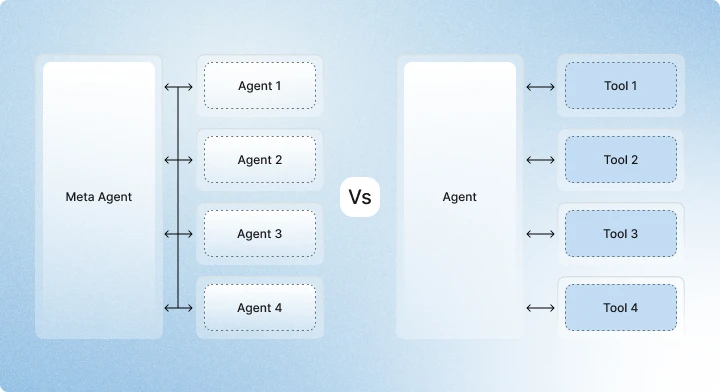
Manus is an AI agent that operates a browser. It fills forms, navigates websites, and completes multi-step online tasks. Their Wide Research model spins up multiple agents in parallel to tackle a question from different angles, then synthesizes the results.
I use Manus for deep research queries and any task requiring desktop-level interaction — image manipulation, data extraction across multiple sites, competitive intelligence gathering. The parallel agent approach is genuinely fast. What would take me two hours of tab-hopping happens in eight minutes.
Try it: manus.im
04Vapi AI — Voice Agents That Don’t Sound Like Robots
Customer support and outbound sales calling are historically expensive bottlenecks. Vapi is a developer-focused platform for building, testing, and deploying human-like voice AI assistants. It handles speech-to-text and LLM reasoning with latency low enough that conversations feel natural.
The orchestration features are what sell it: detecting when a caller stops speaking, inserting short acknowledgments (“hmm,” “okay”) while processing, and maintaining context across multi-turn conversations. It’s nearly indistinguishable from a human operator in structured scenarios.
Try it: vapi.ai
05Gumloop — Agentic Automation Without Code
Gumloop combines no-code automation and AI agents into one platform. It provides a visual interface with over 115 pre-made blocks, allowing you to build complex, reasoning-based workflows without writing code.
The key difference from Zapier or Make: Gumloop thinks in autonomous agents, not simple reactive chains. When I need to scrape websites, read unstructured data, and categorize it into structured databases automatically, this is what I reach for.
Try it: gumloop.com
06Activepieces — The Open-Source Zapier Killer
Activepieces is what you deploy when Zapier’s pricing starts eating your margins. It’s an AI-native integration platform with hundreds of pre-built connections, and the self-hosted Community Edition gives you full control with no task limits.
What makes it a hidden gem: non-technical teams can drag-and-drop workflows, but developers can customize everything using TypeScript. It bridges marketing operations and technical infrastructure without forcing either side to compromise.
Try it: activepieces.com · Self-hosted: Free · Cloud: Paid tiers
07Lindy — Custom AI Agents for Specific Jobs
Lindy lets you build custom AI agents (“Lindies”) for repetitive, specific tasks. I’ve used them for lead research, email drafting, meeting scheduling, and competitive monitoring. Each agent has its own context, instructions, and decision rules.
The conditional workflow system is the standout feature. You can set an agent to behave differently based on context: if an email is from a VIP client or investor, route it immediately to your phone; if it’s a general inquiry, have the agent draft and save a response for review.
Try it: lindy.ai
08NotebookLM — Grounded Research That Won’t Hallucinate
Google’s NotebookLM is free and powerful in a way that seems almost unfair. Upload your sources — PDFs, docs, web links, even YouTube videos — and it creates an AI expert on only that material. It won’t hallucinate facts from the internet because it literally can’t access the internet. It only knows what you give it.
The Audio Overview feature turns your sources into a podcast-style discussion between two AI hosts. I use this for dense research papers I need to absorb while commuting. Paste in a video URL, and you can interrogate the transcript — ask questions, pull key points, compare with other sources. See why it’s ranked among the best free AI research tools.
Try it: notebooklm.google.com · Completely free
09Perplexity — The Search Engine That Should Have Existed
Perplexity combines live web search with AI synthesis. Ask a question, get a synthesized answer with inline citations you can verify. It uses multiple models under the hood and searches the web in real time.
I use this daily for quick research — industry stats, competitor analysis, fact-checking. It eliminates the need to click through ten tabs of SEO-optimized fluff. The Pro mode asks clarifying questions to narrow intent and runs multiple concurrent searches. Read more about how startups use Perplexity for market research.
Try it: perplexity.ai · Free tier · Pro: ~$17/mo
10OpenClaw — Build Your Own Agent Stack
OpenClaw is open-source software for building custom AI agents that chain together tools, APIs, and models. I run two bots: one for research and synthesis, one for project management. If you have a specific, repeatable workflow, you can turn it into a bot that runs on demand.
One technical note: I use ChatGPT’s OAuth via Codex to power one of my OpenClaw bots. Most other providers don’t allow this because it’s token-intensive. If you’re building agents that need to call models programmatically, this flexibility matters.
Try it: openclaw.com
What I Actually Pay For: My Daily Stack
In the interest of full transparency, here’s what I pay for and use every day:
| Tool | Monthly Cost | Primary Use |
|---|---|---|
| Claude Max | ~$90 | Writing, analysis, coding, Cowork automation |
| ChatGPT Plus | $20 | Voice conversations, image generation, mobile use |
| Cursor Pro | $20 | Software development, code review |
| Manus | Variable | Deep research, multi-agent tasks |
| Perplexity Pro | ~$17 | Quick research, fact-checking |
| Total | ~$147/month | ~15–20 hours saved weekly |
That cost returns roughly 15–20 hours of manual work per week. Not an exaggeration — that’s the measured delta between doing tasks manually and doing them with this stack.
The Tools I No Longer Recommend (And Why)
Zapier for Complex Workflows
Zapier is fine for simple “if this, then that” automations. But once you need branching logic, error handling, or multi-step conditional flows, the pricing escalates fast and the visual interface becomes a liability. Move to Make, Activepieces, or Gumloop.
Generic AI Writing Tools for Published Content
Tools like Jasper and Writesonic produce drafts that require 50% revision. In 2026, generic AI content ranks for nothing. If you’re publishing, write from real experience or don’t publish. The AI should assist your thinking, not replace it.
Mid-Tier Code Assistants
GitHub Copilot is fine, but Cursor and Claude Code have moved past it. Copilot’s free tier (2,000 completions, 50 chat messages) is too restrictive for serious work, and the paid tier doesn’t match Cursor’s codebase awareness. See the full coding tool comparison.
How to Choose Your Stack
The model matters less than the system around it. A well-designed AI agent that routes queries, pulls from your knowledge base, and escalates to humans at the right moment will outperform a raw frontier model every time. Companies deploying AI agents for customer service, sales, and internal support see 40–60% automation rates regardless of which underlying model they use. Salesforce’s AI startup guide confirms this pattern.
What Happens When This List Is Outdated
Everything I just said will be partially wrong by Q4 2026. Cursor will ship a new model. Anthropic will release another Claude tier. Some tool on this list will be acquired and ruined. Some tool I haven’t heard of yet will become essential.
The preparation is simple: build a testing habit. Spend one hour every two weeks trying a new tool in your actual workflow. Not a demo. Real work. The edge in 2026 isn’t knowing the most tools — it’s knowing which tools to trust before everyone else catches on.
“The goal is not content that ranks. The goal is content so genuinely useful and unmistakably human that ranking becomes a side effect.” — Anti-Templating Content System v2.0